
疑難排解
執行 Tor VPN 時常見錯誤的疑難排解。
若 Tor VPN 無法連線,您可能會看到錯誤訊息:
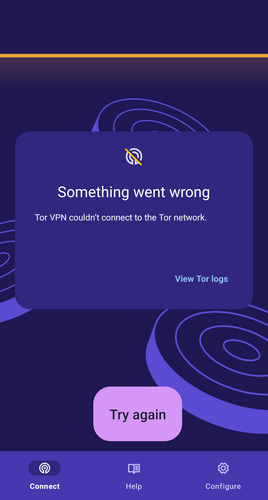
Tor VPN 連線錯誤。
疑難排解時,請依序嘗試以下方法:
檢查 Android 設定
- 請確認沒有其他 VPN 應用程式正在執行。 Android 不允許同時使用多個 VPN 應用程式。
- 請確認沒有網路防火牆應用程式正在執行。 防火牆應用程式通常會佔用 VPN 連線;若正在執行,Tor VPN 將無法建立連線。
變更私人 DNS 設定
Tor VPN 不支援手動設定 DNS 供應商主機名稱,因為這樣做會繞過 Tor,並讓 DNS 供應商得知您造訪的網站。 使用 Tor VPN 時,DNS 解析由您 Tor 電路中的 Tor 出口節點處理。 如果您曾在 Android 的網路設定中設定 DNS 主機名稱,可依照下列步驟變更:
- 前往 Android 裝置的「網路和網際網路」設定。
- 點選「私人 DNS」。
- 將其設定為「關閉」或「自動」。
檢查 Tor VPN 應用程式
查看 Tor VPN 記錄有助於診斷問題。 取得 Tor VPN 記錄的方式:
- 在錯誤訊息或「連線」畫面中點選「檢視 Tor 記錄」。
- 點選「設定」。
- 捲動到 Tor VPN 設定中的「進階」區塊。
- 點選「Tor 記錄」。
錯誤 #1:請檢查網路連線
00:00:00:00 W/onionmasq: onion_tunnel::runtime: Arti failed to connect to [2a00:ccc1:1:2c::1]:9000: Network is unreachable (os error 101)
00:00:00:00 W/onionmasq: tor_chanmgr::transport::default: Connection to [scrubbed] failed: error: Network is unreachable (os error 101)
錯誤 #2:請檢查您的網路是否封鎖 Tor。
00:00:00:000 E/onionmasq: onionmasq_mobile::ffi: runProxy() returned error: couldn't start onionmasq proxy
00:00:00:000 CONNECTION_ERROR
00:00:00:000 D/onionmasq: onionmasq_mobile: closing proxy...
此時可嘗試其中一種審查規避方式。