
رفع مشکل
Troubleshooting common errors when running Tor VPN.
If Tor VPN is unable to connect, you might see a error message:
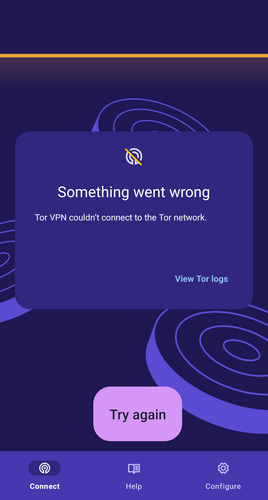
Connection Error on Tor VPN.
To troubleshoot, try each of the following:
Check Android settings
- Ensure you do not have another VPN app running. Android does not permit the use of multiple VPN applications at the same time.
- Please ensure a network firewall application is not running. Firewall application usually use a VPN connection and if running, will prohibit Tor VPN from making any connections.
Change Private DNS settings
Tor VPN does not support setting the DNS provider hostname manually, as doing so bypasses Tor and reveals the sites you visit to the DNS provider. When using Tor VPN, DNS resolution is done by the Tor exit relay in your Tor circuit. If you have configured a DNS hostname on your Android's Network settings, you can change them following this steps:
- Navigate to your Android device's Network and Internet settings.
- Tap on 'Private DNS'.
- Set it to either 'Off' or 'Automatic'.
Check on the Tor VPN application
Taking a look at the Tor VPN logs can be helpful in diagnosing the issue. To fetch the Tor VPN logs:
- Tap on "View Tor logs" from the error message or from the "Connect" screen.
- Tap on "Configure".
- Scroll to the "Advanced" section of the Tor VPN settings.
- Tap on "Tor logs".
Error #1: Check Internet Connectivity
00:00:00:00 W/onionmasq: onion_tunnel::runtime: Arti failed to connect to [2a00:ccc1:1:2c::1]:9000: Network is unreachable (os error 101)
00:00:00:00 W/onionmasq: tor_chanmgr::transport::default: Connection to [scrubbed] failed: error: Network is unreachable (os error 101)
Error #2: Check if Tor is censored in your network.
00:00:00:000 E/onionmasq: onionmasq_mobile::ffi: runProxy() returned error: couldn't start onionmasq proxy
00:00:00:000 CONNECTION_ERROR
00:00:00:000 D/onionmasq: onionmasq_mobile: closing proxy...
In this case, trying one of the censorship circumvention methods might work.