故障排除
Tor VPN 运行过程中常见错误的故障排除。
如果 Tor VPN 无法连接,您可能会看到错误消息:
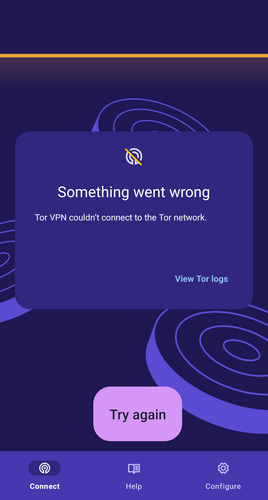
Tor VPN 连接错误。
要进行故障排除,请尝试以下每种方法:
检查 Android 设置
- 确保您没有运行其他 VPN 应用。 Android 不允许同时使用多个 VPN 应用程序。
- 请确保网络防火墙应用程序未运行。 防火墙应用程序通常使用 VPN 连接,如果运行,将禁止 Tor VPN 建立任何连接。
Change Private DNS settings
Tor VPN does not support setting the DNS provider hostname manually, as doing so bypasses Tor and reveals the sites you visit to the DNS provider. When using Tor VPN, DNS resolution is done by the Tor exit relay in your Tor circuit. If you have configured a DNS hostname on your Android's Network settings, you can change them following this steps:
- Navigate to your Android device's Network and Internet settings.
- Tap on 'Private DNS'.
- Set it to either 'Off' or 'Automatic'.
检查 Tor VPN 应用程序
查看 Tor VPN 日志有助于诊断问题。 要获取 Tor VPN 日志:
- 在错误消息或“连接”屏幕上点击“查看 Tor 日志”。
- 点击“配置”。
- 滚动到 Tor VPN 设置的“高级”部分。
- 点击“Tor 日志”。
错误 #1:检查互联网连接
00:00:00:00 W/onionmasq: onion_tunnel::runtime: Arti failed to connect to [2a00:ccc1:1:2c::1]:9000: Network is unreachable (os error 101)
00:00:00:00 W/onionmasq: tor_chanmgr::transport::default: Connection to [scrubbed] failed: error: Network is unreachable (os error 101)
错误 #2:检查 Tor 是否在您的网络中受到审查。
00:00:00:000 E/onionmasq: onionmasq_mobile::ffi: runProxy() returned error: couldn't start onionmasq proxy
00:00:00:000 CONNECTION_ERROR
00:00:00:000 D/onionmasq: onionmasq_mobile: closing proxy...
在这种情况下,尝试某种审查规避方法可能会奏效。